Everything you think you
know about next/image is wrong!
November 2026
Everyone uses next/image, but very few actually understand what happens behind the scenes. In this blog, I'll break down exactly how next/image works under the hood, without the boring documentation tone.
Let’s start with this very basic snippet, which I believe everyone reading this is familiar with:
Core Architecture
The core architecture of next/image is primarily made up of three components.
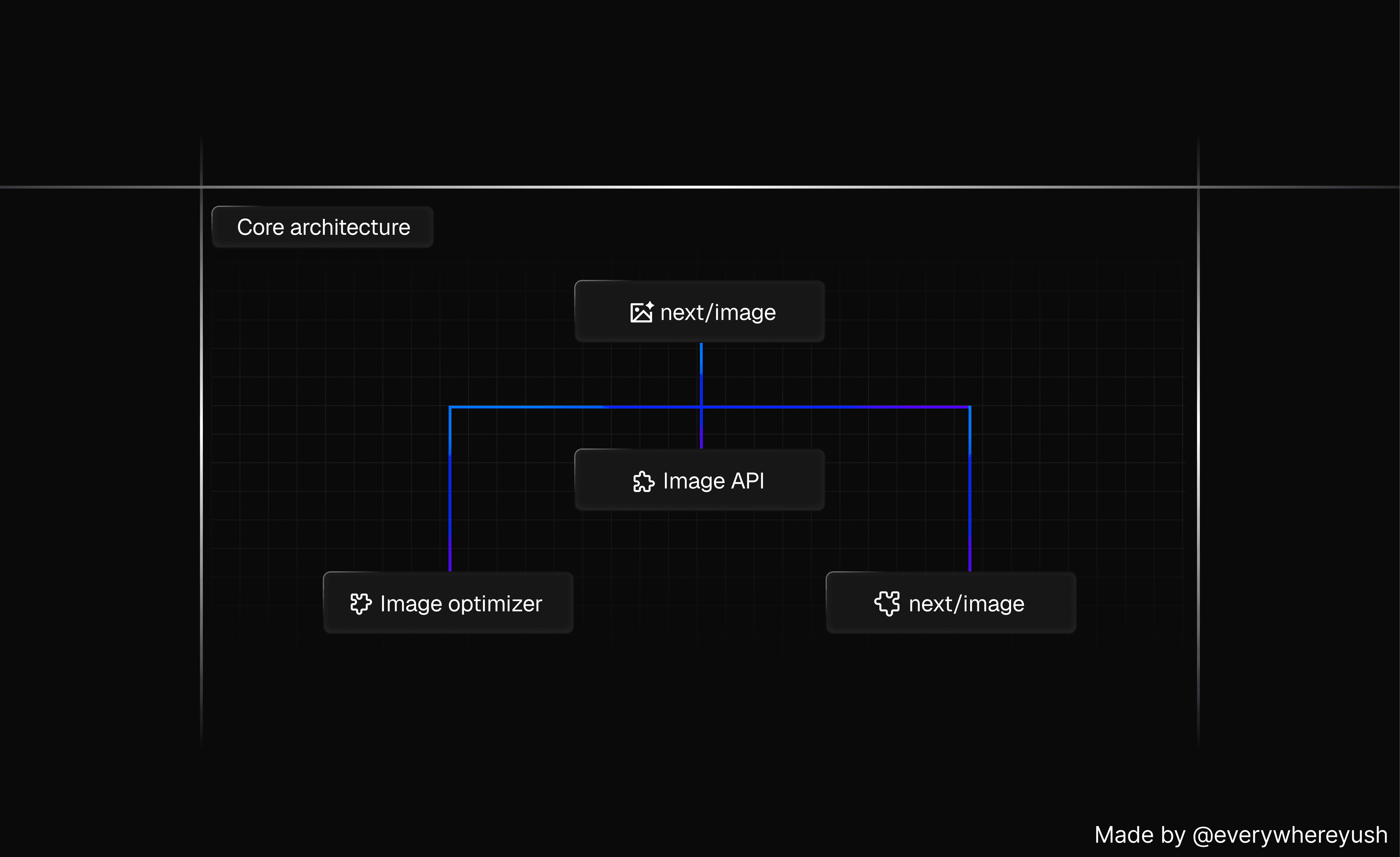
Core Architecture breakdown
- React Component
- Image API
- Image Optimizer
React Component
next/image is nothing but a react component and its primary function is to generate correct HTML image output based on the properties provided and also it constructs multiple URLs which points to different sized versions of the same image, you can call optimized variants.
Basically, next/image doesn’t just output one imagetag with a single src . Instead it generates multiple versions of the same image with different sizes and constructs the appropriate HTML to serve the best possible version for each device.
The component generates optimized image URLs for different resolutions and populate them in the srcset and src attributes of the final HTML img element, so browsers can load the right image size for each device automatically. here is the example code which is output of Next Image component.
Take a closer look at the generated URL:
/_next/image?url=/images/example.jpg&w=640&q=75
This encoded URL accepts two parameters w and q which stands for width and quality respectively, which are more visible in the decoded version. Now you might have observed there is no h height attribute, for now just keep this in mind I’ll connect the dot ahead.
Image API
The next image api serves as an image proxy, meaning nextjs stands between your app and the original image source. It fetches, optimizes, caches and serves the image on your behalf. It is very similar to IPX. It perform these tasks.
- Accepts an image URL, width and quality.
- Validates parameters
- Determine cache control policies
- Process the image
- Serves the image in a format supported by the user’s browser
Now at this point, things are started to take a shape or started making sense. Now let’s jump to the final piece of the puzzle.
Image Optimizer
Next Image utilizes different image optimization libraries such as Sharp or Squoosh, depending on certain conditions.
Sharp is a fast and efficient image optimization library library for node.js that makes use of the Native libvips library.
Squoosh is a fully node-based image optimization solution. It’s slower than the Sharp, but it doesn’t require any additional libraries to be installed on a machine. For this reason, Sharp is recommended for production use, whereas Squoosh is used by default in local environments.
Results
Now you know what is the primary architecture behind the next/image . Now we can debunk common misconceptions and glean more insights on how to utilize it more effectively.
next/image does not crop.
A common misconception among devs is that next/image can crop their images. This question arises because you can pass width, height and fill properties to the component, which may create an impression that the image is being cropped. But in reality this isn’t the case. The next image component primarily requires the width and height for assigning to the img tag to prevent layout shifts.
Now connecting the dot of that height attribute that I talked about above in the React Component. The Image API does not accept the height parameter because it currently isn’t possible to change the original image’s aspect ratio, which means. If you don’t use the fill property, the image will simply stretch or shrink in cases of width–height mismatches.
However there is an exception if you’re using tailwindcss, it behaves differently due its default global css rule. This makes layout shifts issues harder to detect, here is the snippet of the rule.
Displayed Image width ≠ global image width
Another potential point of confusion is that the width property passed to next/image doesn't represent the actual width to which the image will be resized when the screen will be subjected to a lower width scenerio. As we noted from the example at the start of the blog, passing width=500 to a component will result in the image being resized to a width of 640px, as evident in the generated URL:
/_next/image?url=/images/example.jpg&w=640&q=75
If you expect the x2 retina version to utilize an image width of1000px or 1280px, you're in for a surprise. The actual width used will be 1080px. Naturally, naturally you might wonder where these numbers are coming from.
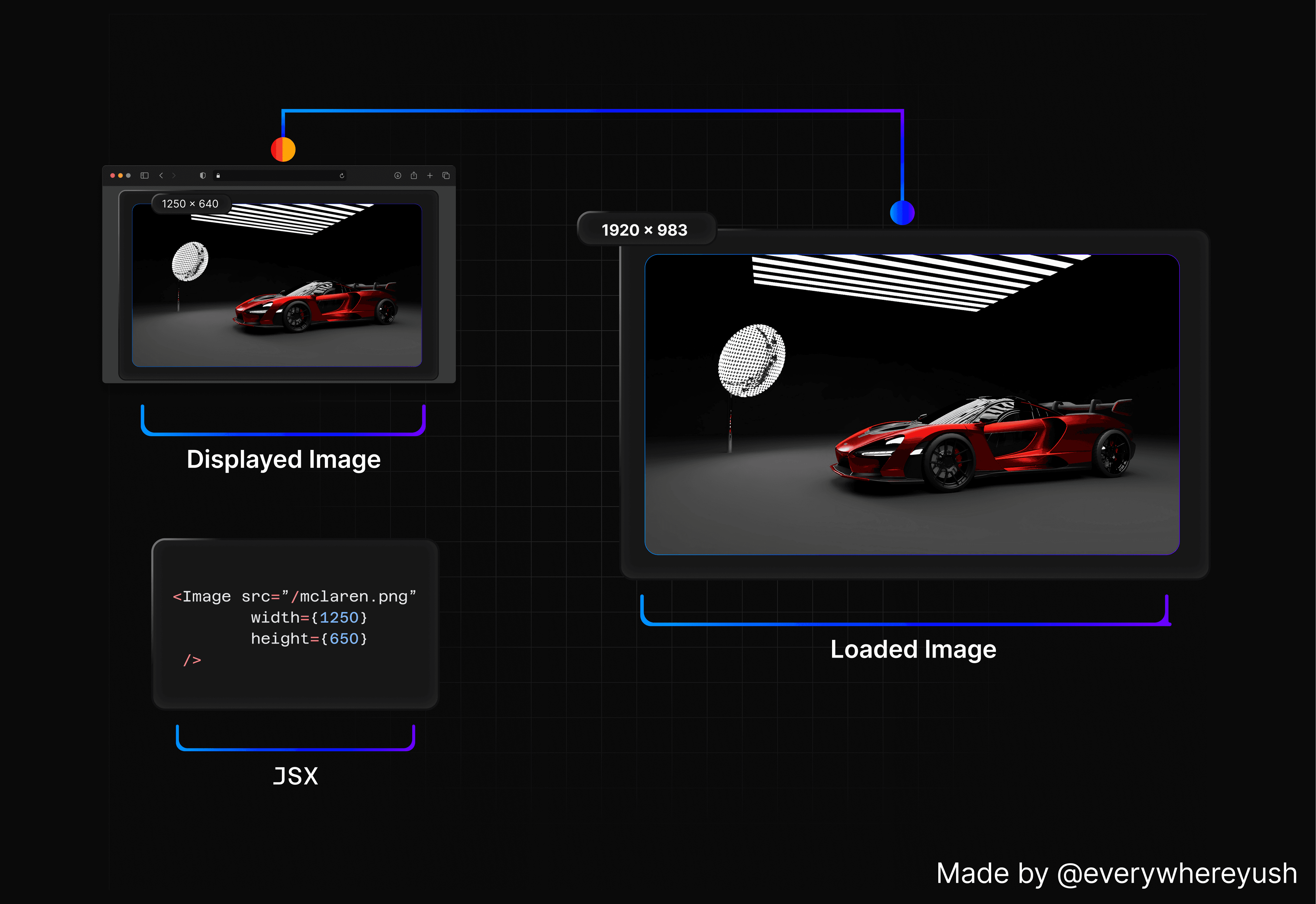
Next.js resizes images to the closest size from an array ofdeviceSizes and imageSizes that you can define in next.config.js. By default, these are:
What’s crucial to note here is that using the default configuration can negatively impact performance, leading to a reduced score in Lighthouse’s Page Speed Insights. This becomes particularly evident when you attempt to display large images on a page. For instance, if you want to render an image with a width of 1250px, the actual loaded image width will be 1920px. The discrepancy between the required size and the actual loaded size becomes even greater for x2 retina versions, as these will be resized to 3840px. However, you can remedy this by adding more sizes to the deviceSizes or imageSizes arrays.
Image optimization can be used without the next/image component
I already discussed about the image api above, with this understanding of the core architecture, it’s very obvious that you can use Image API without necessarily using next/image . But is this really a good option? Let’s find out and see some scenarios in which this can be useful.
First, you can render optimized images inside a canvas. Regardless of whether you’re loading images onto a canvas from external sources or from local storage, you can pass the correct URL to the API and have it work seamlessly.
First, you can render optimized images inside a canvas. Regardless of whether you’re loading images onto a canvas from external sources or from local storage, you can pass the correct URL to the API and have it work seamlessly.
/_next/image?url=/images/example.jpg&w=640&q=75
Always remember, the width parameter is checked by the API and can only be a number sourced from either the deviceSizes or imageSizes configuration.
Use import for local images
In next/image , there are two ways by which you load local images:
Using an absolute path for local images is pretty common — you’ll see it in examples, tutorials, and even open-source projects. And it’s easy to assume the only difference is that Next.js won’t auto-assign the width and height. But nope, there is a real difference. When you load images using an absolute path from the public folder, Next.js follows the cache headers of the server, which defaults to a 30-day cache instead of public,max-age=31536000,immutable. And yeah, that 30-day cache can actually hurt your Lighthouse score quite a bit.
Conclusions
I am sure at this point, you’re also exhausted like I am. Well then let’s draw the conclusion and end this blog.
Image optimization (next/image) provides significant advantages and simplifies image management, it could benefit from additional features like advanced cropping and precise resizing, similar to third-party solutions.
Well personally in my opinion, for most use case, the developer experience and efficiency of Next Image will be more than enough.
Ending this blog with lot’s of love. If you like this blog please share it with your friends. You can always suggest me some topics in comments or DM me. I will try my best to make an article out of it.
I am dropping below all the resources which made it possible for me to write this blog. And I really appreciate all the work they’ve done.
Thank You!